
Download Poetic Waves – Chinese Color Poetry Background Animation
Overview
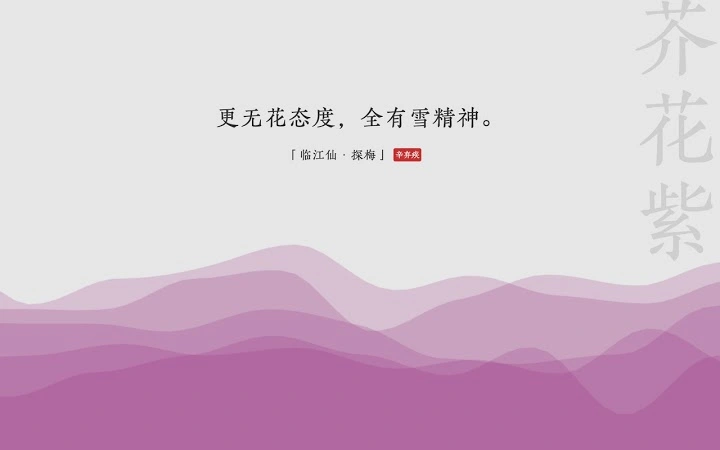
Poetic Waves is a unique desktop application that merges artistic expression with creative coding, offering a meditative and visually rich experience. Built using P5.js, the software generates animated backgrounds that evoke traditional Chinese aesthetics, particularly inspired by natural landscapes and poetic意境. Its core purpose is not utility-driven but experiential—intended for users who appreciate the fusion of art, culture, and code.
The application presents a dynamic interface where waves, blobs, and color transitions interact with user input, creating a sense of movement and depth. Each visual element is paired with curated poetry, allowing users to engage with classical Chinese verses in a modern, digital format. The software is especially suited for digital artists, UI/UX designers, developers exploring creative coding, and anyone drawn to abstract, culturally inspired visuals.
While not designed for productivity, Poetic Waves serves as a personal creative tool and ambient backdrop for focused work or relaxation. The developer has emphasized its experimental nature, describing it as a personal project in the journey of creative programming. Real-world use cases include setting a contemplative mood during creative sessions, enhancing digital art displays, or simply enjoying a unique aesthetic experience on a desktop.
Key Features & Capabilities
- Dynamic Background Animations – Powered by P5.js, the app generates fluid, layering wave and blob animations that respond to user interaction, creating a sense of depth and motion reminiscent of traditional Chinese ink painting.
- Chinese Color Palette Integration – Features an expanding selection of traditional Chinese colors (e.g., “Lan Tian,” “Chun He”), which appear in the animation and fade at the screen edges, adding cultural and visual richness.
- Interactive Controls – Users can toggle animations with the Space key and save current backgrounds using the S key. A right-bottom menu offers additional settings, including animation playback preferences and color persistence options.
- Integrated Poetry Display – Displays curated Chinese poetry with responsive typography that adjusts to screen width. Each poem is accompanied by a credit and may link to Google search for further context.
- Customization Options – Includes features such as hiding the search bar, selecting alternative search engines, and enabling random color transitions within the wave background.
- Export Functionality – Allows users to download the current animation state as a visual snapshot, preserving moments of aesthetic resonance.
These features combine to create a deeply immersive experience. For example, a designer might use the app as a background during brainstorming sessions, letting the waves and colors stimulate creative thinking. A developer might study the codebase to understand P5.js animation patterns. A poetry enthusiast could explore how traditional verses interact with modern visual design.
User Interface, Workflow & Performance
The user interface of Poetic Waves is minimal and intentionally focused on visual experience. The main canvas dominates the screen, with subtle controls positioned in the lower-right corner. Navigation is straightforward: keyboard shortcuts (Space, S) handle core interactions, and the right-bottom menu provides access to settings without cluttering the visual space.
Workflow efficiency is optimized for ease of use. Users can quickly activate or pause animations, toggle visibility of interface elements, and save preferred states with minimal effort. The responsive typography ensures readability across various screen sizes, and the layout adapts dynamically to maintain visual harmony.
Performance observations are based on general software behavior patterns. The application runs smoothly on supported platforms, leveraging P5.js’s lightweight rendering engine. However, exact performance details were not specified by the developer. Resource usage, including CPU and RAM consumption, remains unspecified. The developer did not provide additional system requirements, so users should expect standard desktop application behavior under normal conditions.
Compatibility & System Requirements
Poetic Waves is available for Windows, Mac, and Linux, making it accessible to a broad user base across major desktop operating systems. The software version is 2.2.0, with a download size of 100 MB.
Exact system requirements were not listed. Compatibility information was partially provided, indicating support for modern desktop environments. Users should ensure their system meets general requirements for running web-based applications, particularly those using JavaScript and canvas rendering.
The application does not require installation of external dependencies beyond the standard runtime environment. It is distributed as a standalone desktop package, simplifying deployment across different platforms.
Pros and Cons
Pros
- Beautiful, culturally inspired visual design rooted in Chinese aesthetics
- Smooth animations powered by P5.js with interactive elements
- Customizable features like color persistence, search bar visibility, and animation controls
- Supports multiple platforms: Windows, Mac, and Linux
- Free to download and use with no licensing restrictions
- Encourages creative exploration and personal expression
Cons
- Limited practical utility; not designed for productivity tasks
- No detailed system requirements or performance metrics provided
- Visual focus may distract from other work tasks
- Requires a browser-like runtime environment to function
- Updates are user-driven and may lack formal support channels
FAQ Section
Is Poetic Waves available for Windows, Mac, and Linux?
Yes, the software is compatible with Windows, Mac, and Linux operating systems.
Is the software free to download and use?
Yes, Poetic Waves is completely free to download and use without any cost or subscription.
Can I use Poetic Waves offline?
Yes, once installed, the application can be used without an internet connection, though some features like Google search integration may require online access.
Does the software support custom poetry or images?
The current version does not support user-uploaded poetry or images. Content is pre-curated and managed by the developer.
How often are updates released?
Updates are released based on developer feedback and personal development cycles. The latest version is 2.2.0, released on July 5, 2024.
Final Thoughts + CTA
Poetic Waves stands out as a rare blend of art, culture, and code—a desktop experience that prioritizes beauty and emotional resonance over functionality. While not a tool for everyday tasks, it excels in creating an ambient, reflective environment ideal for creative professionals, digital artists, and anyone seeking a moment of calm in a digital world.
Its thoughtful integration of Chinese color palettes, poetic text, and responsive animations makes it a standout in the niche of artistic software. The developer’s commitment to user feedback and continuous improvement is evident in the regular updates and feature additions.
For those who value aesthetics, cultural expression, and experimental design, Poetic Waves offers a meaningful and visually rewarding experience. Download Poetic Waves now and immerse yourself in a digital landscape where poetry flows with the waves.







